2-in-1 Bluetooth 5.4 Audio Transmitter/Receiver with OLED Display and Dual Connection: Setup, Uses, and Buying Notes
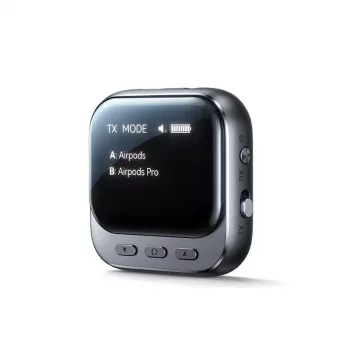
A compact Bluetooth audio transmitter/receiver can modernize older audio gear, make travel entertainment easier, and simplify daily listening—without replacing headphones or speakers. A 2-in-1 Bluetooth 5.4 unit with an OLED screen and dual connection is built to switch between “send” and “receive” roles quickly, making it a handy bridge between wired audio ports and Bluetooth devices.
What a 2-in-1 transmitter/receiver actually does
These adapters solve two different problems depending on the mode you choose:
- Transmitter mode (TX): takes audio from a wired source (TV, airplane seat screen, PC, console, projector) and sends it to Bluetooth headphones or speakers.
- Receiver mode (RX): takes audio from a Bluetooth source (phone/tablet) and outputs it to wired gear (car AUX, powered speakers, amplifiers) through an audio cable.
- One device switching roles can replace multiple single-purpose adapters in a travel kit or living room setup.
- While Bluetooth 5.4 is designed for efficient, stable connections, real-world performance still depends on distance, interference, and the paired devices.
Common use-cases by mode
| Scenario |
Mode |
Audio flow |
What you need |
| TV with no Bluetooth |
TX |
TV (wired out) → headphones |
TV audio-out cable + Bluetooth headphones |
| Plane seat screen |
TX |
Seat jack → headphones |
Airplane adapter (if needed) + Bluetooth headphones |
| Car stereo with AUX |
RX |
Phone → car speakers (AUX) |
AUX cable + car AUX input |
| Old speakers with 3.5mm input |
RX |
Phone → powered speakers |
3.5mm cable + speakers |
Why an OLED display matters day-to-day
An OLED screen sounds like a “nice-to-have” until you start moving the adapter between rooms, devices, and modes. The display can make routine use smoother in a few practical ways:
- Clear mode confirmation: Seeing TX or RX at a glance helps avoid the most common mistake—trying to pair in the wrong mode.
- Pairing and connection visibility: Status indicators make it easier to tell whether it’s searching, connected, or idle, which speeds up troubleshooting.
- Better usability in low light: Flights, bedrooms, and behind-the-TV installations are easier to manage when you don’t have to guess what the device is doing.
- Dual-connection awareness: If the adapter supports two links, a display can help confirm whether one or two devices are connected.
Dual connection: when it helps and when it doesn’t
Dual connection (sometimes called “dual link”) can be a standout feature, but it’s most valuable in specific situations:
- Shared listening: Connect two Bluetooth headphones to one transmitter so two people can watch a movie without raising the TV volume.
- Flexible switching: Some implementations allow one device to remain connected while you pair a second, reducing re-pairing friction.
- Expect trade-offs: Dual connections can reduce effective range or make volume balancing trickier, depending on headphone models and codec behavior.
- Best-case pairing: Two similar headphone models, kept within a clear line of sight, typically provide the most consistent results.
Setup walkthroughs (TX and RX)
TX setup (TV/PC/console → Bluetooth headphones)
RX setup (phone → car AUX / wired speakers)
Latency and video sync: what to expect
For deeper technical background on Bluetooth capabilities and evolution, the official references from the Bluetooth Core Specification and Bluetooth SIG audio overview are useful.
Compatibility checks before buying or plugging in
Quick pre-purchase checklist
| Check |
Why it matters |
| Audio port type (3.5mm/optical/RCA) |
Determines whether extra adapters are needed |
| Goal (TX vs RX) |
Ensures the mode matches the intended setup |
| Need for two headphones |
Dual connection is not essential for solo listening |
| TV/car limitations |
Some outputs mute speakers or have fixed volume |
Care, placement, and everyday reliability tips
- Keep it close: placing the adapter within a few feet of the listening position can improve stability, especially through walls or TV stands.
- Avoid interference hotspots: don’t tuck it against Wi‑Fi routers, USB 3.0 hubs, or dense cable bundles. If you suspect interference, the FCC’s general guidance on troubleshooting is helpful: FCC interference and unlicensed devices.
- Use short, snug cables: less strain on the port is especially important for travel use.
- Secure it in the car: preventing cable tug helps protect the AUX jack over bumps and turns.
Product options in stock
At-a-glance details
FAQ
Can a Bluetooth transmitter connect to two headphones at the same time?
Yes, if the transmitter supports dual connection, it can often link to two headphones for shared listening. Stability and perceived delay can vary by headphone model and codec support, so two similar headphones kept nearby usually work best.
Will there be audio delay when watching TV through Bluetooth?
There can be, because Bluetooth adds processing time and the amount depends on codec support on both the transmitter and your headphones. If your TV offers an audio delay setting, it can sometimes reduce lip-sync mismatch.
How do TX and RX modes differ on a 2-in-1 adapter?
TX (transmitter) sends audio from a wired source like a TV to Bluetooth headphones, while RX (receiver) takes Bluetooth audio from a phone and outputs it to a wired input like a car AUX port.
Recommended for you



Leave a comment