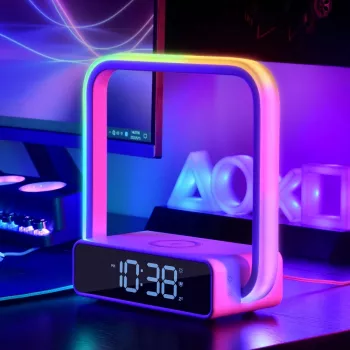
A bedside setup works best when it reduces friction: soft light for winding down, a reliable alarm for mornings, and a simple place to charge a phone without extra cables. A touch lamp alarm clock with wireless charging combines these daily essentials into one compact device, helping keep nightstands clear and routines consistent. Instead of juggling a lamp switch, a separate clock, and a charging cable that falls behind the bed, you get a single, stable hub that’s ready day after day.
This style of bedside unit is designed to cover the most common “reach-for-it” needs from bedtime through the first minutes of the morning.
Swapping bright overhead lighting for a gentler bedside glow can make evenings feel less abrupt. Touch control also makes it easier to tweak brightness without getting fully alert again.
If you wake up to get a drink of water or check on a child, a touch lamp reduces the “search for the switch” routine. Light on demand can also mean fewer stumbles and less harsh glare.
Using a dedicated alarm clock can help keep the time visible while keeping the phone’s notifications from becoming the first thing you engage with. You can still charge your phone nearby—just not rely on it for everything.
Smaller spaces benefit from fewer cords, fewer items to juggle, and less “where did that cable go?” A single multi-function unit is easier to pack and easier to keep tidy.
A guest room feels more thoughtful when visitors can instantly find a light, check the time, and charge a phone without asking which cord to use.
Wireless charging is mostly about convenience. It works best when the phone is compatible and the charging surface is clear and properly aligned.
For a deeper look at the Qi standard itself, the Wireless Power Consortium is the primary reference. For general consumer guidance around wireless devices, the FCC’s consumer guide is also a helpful baseline.
| Check | What to do | Why it matters |
|---|---|---|
| Phone supports Qi wireless charging | Confirm in phone specs or settings | Non-Qi phones will not charge wirelessly |
| Case thickness and materials | Remove thick/metal cases or magnetic plates | Prevents heat, slipping, and poor charging |
| Placement on the pad | Center the phone on the charging area | Alignment improves charging reliability |
| Power source | Use a quality wall adapter and cable | Insufficient power can cause slow or inconsistent charging |
Touch controls are less about novelty and more about reducing micro-annoyances. If you’ve ever tried to find a switch without fully opening your eyes, you already understand the appeal.
If the goal is a tidier, more functional surface overall, pairing a streamlined bedside device with a practical organizing approach can help. For broader, room-level decluttering ideas, consider Clear & Cozy: Smart Ideas for Tackling Living Room Clutter.
Touch Lamp Alarm Clock with Wireless Charging is a single bedside device designed to combine touch lighting, an alarm clock display, and cable-free phone charging. It’s a strong fit for clearing visual clutter while keeping the basics within easy reach; best results come from pairing it with a quality power adapter and using a Qi-compatible phone.
If the same “less friction” mindset applies to your desk, Hands at Ease: Stop Mouse Pain Fast is a practical guide for improving ergonomic habits and comfort during computer time.
For households managing nighttime routines, Midnight Diaper Duty Made Easy can help reduce the “where is everything?” scramble by keeping essentials organized and consistent.
| Item | Type | Best for |
|---|---|---|
| Touch Lamp Alarm Clock with Wireless Charging | Lamp + alarm clock + wireless charger | Nightstands, dorm rooms, guest rooms, small-space setups |
Often yes with thin, non-metal cases, but thick cases, metal plates, and some magnetic accessories can prevent charging or make it inconsistent. If charging is spotty, try removing the case or any attached accessories and test again.
Slow or interrupted charging is usually caused by misalignment on the charging spot, a low-quality or underpowered wall adapter, heat buildup, or a thick case creating too much distance. Re-center the phone and test without the case to narrow down the cause.
Reputable Qi charging is designed to manage power and reduce overcharging during long charging sessions. For best safety and performance, keep the surface clear for ventilation and use a quality adapter, and follow your phone manufacturer’s guidance.






Leave a comment