A cleaner pair of earbuds starts with a smarter tool
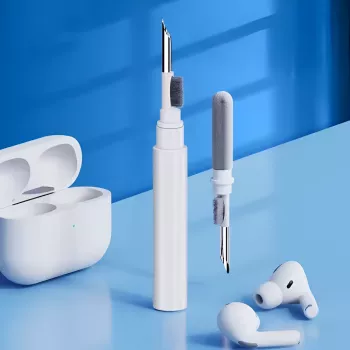
Earbuds and charging cases pick up earwax, lint, and pocket dust faster than most people realize. Over time, that buildup can affect comfort, hygiene, and even how reliably your earbuds charge if debris gets near the contact points. A compact 3-in-1 cleaning pen is an easy way to reach speaker grilles, seams, and case corners with tools sized for small electronics—without resorting to rough scraping or oversized cotton swabs.
For brand-specific guidance on safe cleaning, it’s also worth reviewing Apple Support: Clean your AirPods, which emphasizes gentle methods and avoiding excess moisture.
Why earbuds and cases get dirty so fast
- Earwax and skin oils build up on ear tips and speaker mesh during daily use.
- Pocket and bag lint transfers into the charging case and clings to magnets and seams.
- Dust on charging pins and contact points can interrupt charging or cause intermittent connection.
- Moisture from workouts and humid environments can trap grime in tight gaps.
Even if the earbuds look “fine” at a glance, the tightest areas—like the rim around the speaker grille or the corners of the charging wells—can quietly collect debris that’s hard to remove once it compacts.
What a 3-in-1 cleaning pen helps with
- Targets small areas that are awkward with cotton swabs or tissues.
- Helps loosen compacted debris in corners, hinge areas, and around charging wells.
- Designed for quick touch-ups after workouts, commutes, or travel days.
- Portable form factor supports frequent cleaning, which is typically safer than aggressive deep-cleaning.
Frequent, light cleaning usually beats occasional “major” cleaning because you’re less likely to press hard, scrape, or accidentally push debris deeper into openings.
Tool overview: 3 working ends for different messes
- Fine tip end: for seams, edges, and tight crevices where wax and dust collect.
- Brush end: for sweeping lint from speaker grilles and case interiors (use light pressure).
- Wider cleaning end: for larger surfaces inside the case and around the lid/hinge area.
- Best practice: start dry and only add minimal moisture to a cloth if needed (never soak).
Common messes and the best tool end to start with
| Area |
Typical buildup |
Best starting end |
Notes |
| Earbud speaker grille |
Fine dust, wax film |
Brush |
Use gentle strokes; avoid pushing debris deeper. |
| Earbud seams |
Compacted wax, grime |
Fine tip |
Work along the seam; lift debris out in small passes. |
| Charging case wells |
Lint, pocket debris |
Brush then wider end |
Brush first, then wipe loosened debris away. |
| Charging contacts |
Dust, residue |
Brush (very light) |
Keep tools dry; avoid scratching metal contacts. |
| Hinge/lid edges |
Dust packed into corners |
Fine tip |
Clean with the case open; keep debris out of the hinge. |
| Outer case shell |
Fingerprints, grime |
Wider end (dry) + cloth |
Finish with a soft microfiber cloth. |
Step-by-step: cleaning earbuds and the charging case
- Power down and separate pieces. Remove earbuds from the case and keep the case lid fully open.
- Start dry. Use the brush to sweep loose lint from the case interior and earbud surfaces. Light strokes are enough—especially over grilles.
- Detail the tight areas. Use the fine tip to lift debris from seams, corners, and around speaker grilles without puncturing or snagging mesh.
- Clean broader surfaces. Use the wider end to clean flat interior areas of the case and along the rim where debris gathers.
- Remove what you loosened. Tap or gently shake loose debris out of the case (angle away from the hinge) and wipe with a microfiber cloth.
- Let it dry completely. If you used any moisture on a cloth, allow everything to air-dry. Make sure contacts are fully dry before charging.
If you ever feel the need to add moisture, use it sparingly and keep it away from openings. General safety guidance on cleaning practices can be found at CDC: Cleaning and Disinfecting (general guidance).
What to avoid to prevent damage
- Avoid sharp metal objects (pins, needles) that can tear speaker mesh or scratch plastic.
- Avoid compressed air blasts into grilles; it can force debris inward.
- Avoid soaking with water or alcohol; liquid can seep into microphones, sensors, and battery areas.
- Avoid heavy pressure on charging pins and contacts to prevent bending or scratching.
A good rule: if it feels like you’re “digging,” stop and switch to gentler strokes, smaller passes, or a dry brush-first approach.
When to clean (and a simple routine that sticks)
Who this portable cleaning tool is a good fit for
Product options (in stock)
FAQ
Can a cleaning pen be used on Airpods speaker mesh safely?
Yes—use the brush with very light pressure and gentle strokes, and avoid putting sharp tips directly on the mesh. Focus on lifting debris outward rather than pushing it into the grille, and keep tools dry.
What should be used to clean the charging contacts in the case?
Start dry with a soft brush and very gentle strokes to remove dust or lint. Avoid liquids and abrasives, and confirm the contacts are fully dry before putting earbuds back in to charge.
How often should earbuds and the charging case be cleaned?
Do quick touch-ups after heavy use (especially workouts) and a weekly maintenance clean for the case wells, seams, and hinge edges. Clean more often if the case stays in pockets, bags, or dusty environments.
Recommended for you





Leave a comment